@crossingthethreshold Yeah, your provider can cache the files for however long they want: minutes, hours, or days. That’s outside my control, unfortunately. 😢
Replies
@pratik @crossingthethreshold @help If the in-app browser has an address bar, you can just copy & paste the sign-in URL there. If that’s not the case, you have to figure out a creative way to get around the limitation. 🦹
One solution is to navigate to your email provider in the in-app browser, sign in and click the Sign-in to Micro.blog link from there. For example: click the conversation link, and you should end up on Micro.blog (but signed out). Then click Discover followed by 🔍. Search for the name of a decent search engine, like DuckDuckGo. Find a post on the timeline that links to said search engine and, from there, search for your email provider. Now, sign in to your email account and click the Micro.blog sign-in link. You should now be signed in to Micro.blog in the in-app browser. Celebrate! 🥳
Another alternative is to disable the in-app browser in your feed reader to open links in your regular browser instead.
@crossingthethreshold To avoid overloading Micro.blog’s servers, I cache my version of the feeds for 120 seconds, but that means they shouldn’t lag behind the official feed for much more than a couple of minutes or so. I’m looking at my version of your feed right now, and it’s identical to the official one. The latest post is from 30 minutes ago.
@pimoore So good to see you back on the timeline, by the way. You’ve been missed!
@pimoore Those feeds are for subscribing to discovery, emoji, and user timelines, so it doesn’t really make sense as a plug-in to your blog. But it could be a default option for the official feeds. That’s something for @manton to meditate over. 😊
@pimoore I’m hosting a handful of experimental feeds over at micro.blog.via.dahlstrand.net. They add a Conversation on Micro.blog link to each entry like this:

@toddgrotenhuis Thanks, I’m glad you find it useful!
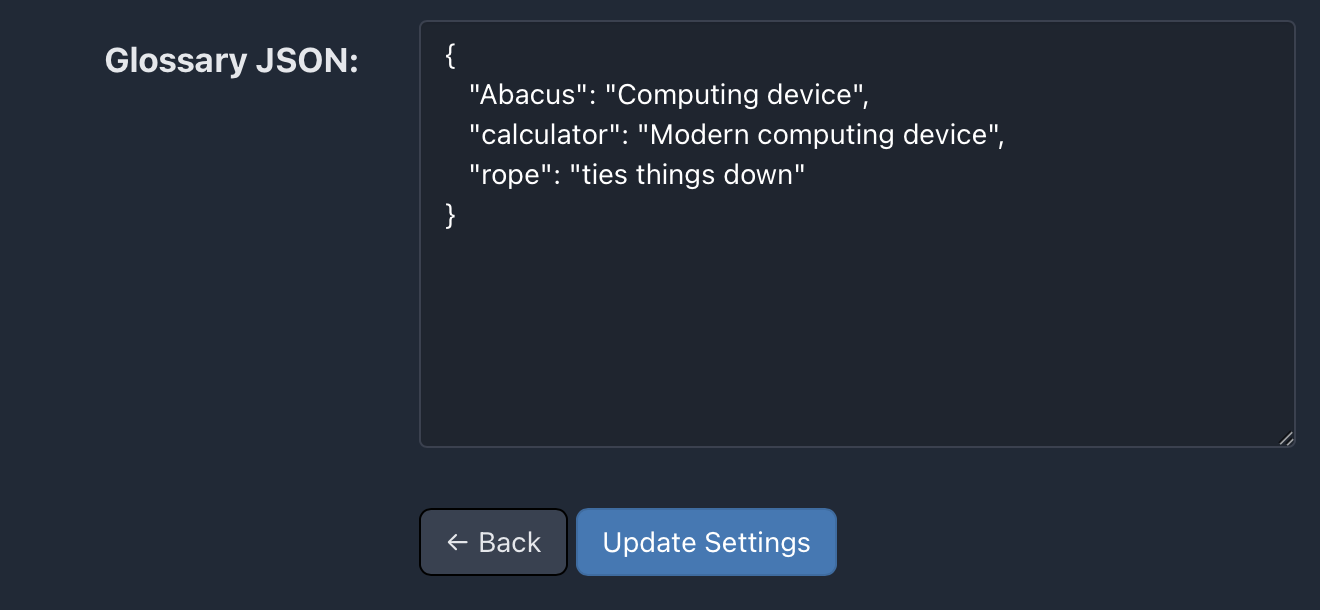
@AndySylvester @help As an alternative, you could expose the glossary data as a JSON field setting instead of a file. That way, people using your plug-in can just hit the Settings button and edit the glossary data directly, like this:
@pratik The editor will be available at another address (on the subdomain of your test blog) but as long as you use the same theme on both blogs the preview will look identical.
@pratik You can work around this by installing my plug-in on your test blog instead.
@JohnPhilpin Forget about the screenshot for a while, the interesting thing with the post is in the text. Or rather, the length of the text. If you count the number of characters, you will end up at around 600 of them. That shouldn’t be possible on the Micro.blog timeline, only posts containing quotes are allowed to be that long before being truncated.
But the post does not contain a quote. So how can it be that long and still show up in its entirety on the timeline? Thanks to a little HTML snippet, shown in the screenshot.
It’s just a silly trick. Or bug. Or feature. 😊
@manton @pratik @JohnPhilpin @moonmehta To all the cheaters out there, I present 600-character limit without a quote. 😇
@toddgrotenhuis I’ve added support now, you should be able to follow https://micro.blog.via.dahlstrand.net/posts/discover/books and so on. Let me know how it works!
@jasonmcfadden A handful of themes have built-in support for my plug-in. For Alpine, though, some assembly is required for the link to show up. The documentation describes the process below the heading Include the Conversation on Micro.blog link in your custom theme. (You need to be signed in to Micro.blog for that link to work.)
@toddgrotenhuis Hehe, sod-ified, I love it! There’s one for the Discover feed, but I guess you’re talking about following a specific emoji category, like books 📚?
@Alligator Yummy! 😋
@Sylari I could force the page into the menu, but I personally don’t like that approach. Some people may not want Magic Preview in their blog’s menu, and if it’s forced in, there’s no user-friendly way to get rid of it. (One has to change the plug-ins code or hide the menu item with CSS.)
You can always add a link to the menu yourself. And, as @manton mentioned, this will hopefully be a lot easier in the future.
If I’m reading you correctly, you just figured out the URL on your own by guessing? Impressive! The URL is mentioned in the plug-in’s documentation, but it’s easy to miss. Maybe the documentation will be more prominent some day.
@tkoola I’m glad you liked it!
@manton Thanks for sharing! 🥰
@jean I signed up with a virtual Swedish phone number via Twilio and it worked fine. Confirmed it now by creating a new, temporary account.
@holgerfrohloff Yeah, it really is remarkable!
@RianVDM Ah, I see, you might be interested in this thread then. 😉
@manton Imagine automatic transcripts and subtitles for microcasts and short videos hosted on Micro.blog. Making them more accessible and great for discoverability and search. That would be a pretty cool feature! 😊
@teisam I hope that too! How does Whisper handle Norwegian? I’ve encountered a few oddities with Swedish transcriptions, but overall I’m very impressed.
@tkoola You’re in for a real treat! I loved this one – hooked from start to finish.
@JohnPhilpin Yes, that was me. Exciting news! I’ll keep an eye on the project and let me know if you need someone to bounce implementation ideas off of.
@RianVDM Hey Rian and thanks for taking Search Space out for a spin. Plans are a strong word. 😊 This is a hobby project, after all, but there are a lot of ideas bouncing around in my head. What kind of customizations do you have in mind?
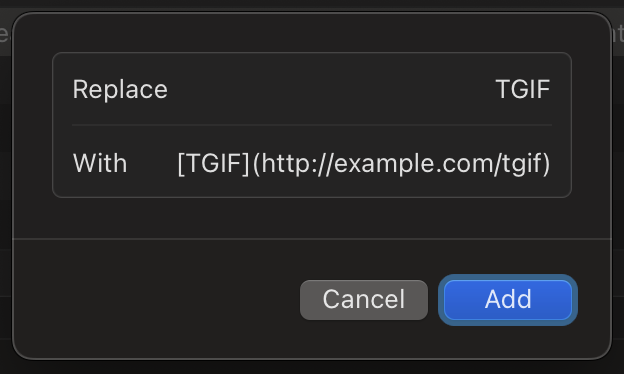
@pratik Yes, Apple’s Text Replacements are global. If you want to avoid triggering them by mistake, you can prefix the trigger word with something that makes sense to you but rarely (never) appears outside of your blogging. For example, make it \TGIF instead of TGIF.
@Parag 🤩
@pratik @JohnPhilpin Say that every time you write TGIF you want that replaced with a hyperlink, suitable for a Micro.blog post. Then you could set up a text replacement like this:
@JohnPhilpin Sounds like a nifty feature! One might have to work around some Hugo-specific quirks, but a plug-in could provide something close to the glossary thing in Drummer.
If I understand it correctly, it’s a text substitution feature. You define in your glossary that ;) should render as 😉 and Emoji as <a href="http://en.wikipedia.org/wiki/Emoji">Emoji</a> and so on.
Definitely doable! You just have to find a developer that wants that feature bad enough in Hugo/Micro.blog. 😊
Until then, an alternative is using text-expanding software like TextExpander or the rudimentary Text Replacements that’s built-in with Apple’s operating systems. In combination with Micro.blog’s search and replace feature, to add (or redefine) links/definitions to words in old blog posts.
@toddgrotenhuis I’m glad you like it! 🥰 Does “follows RSS” equal what you see on your timeline? If so, that’s available as well through https://micro.blog.via.dahlstrand.net/feeds/toddgrotenhuis.json.
@tibz Happy birthday! 🎉
@ericmwalk Yes, that’s definitely doable. But I will leave that as an exercise to the reader. 😋 The available feeds are listed over here.
@ericmwalk Hehe, well, I just saved you some scripting then. You’re welcome/I’m sorry. 😊 Let me know if it works.
@odd Ah, no, my comment was on the original post. Didn’t read the rest of the conversation until now but I’m sure the vegan ones will be fine as well.
@ericmwalk Sure! What part are you interested in? It is just a hack, really, that fetches the original Discover JSON Feed and appends the conversation link to each item. Written in JavaScript and runs on Netlify as an on-demand builder.
P.s. I just added a new experiment. Now you can get user timeline feeds with conversation links like this: https://micro.blog.via.dahlstrand.net/feeds/sod.json (sod can be replaced with any valid Micro.blog username).
@vincent Thank you, Vincent, and congrats on a terrific release! 🎉
@odd I approve of this! 😋
@JohnPhilpin Awww. 🥰 Thank you for checking out my plug-ins, John!
@eggfreckles Haha, that’s a lovely idea, we should make that. For the later Game Boy models, Color and Advance, there actually existed an accessory to connect to the internet: Mobile Adapter GB. 🌐
@pgkr It’s a lovely book cover (and a great read, too)!
@jabel @rcrackley @jaheppler @timapple @pimoore @pcora @ericgregorich @furstenberg @mroutley Thanks everyone! It’s still a work in progress, but we’re quite pleased with how it’s coming along. 💚
@vincent Me too! There’s still stuff left to do, but I promise there will be an update when the project is 100 % completed.
@heyloura Me too! 🥰
@jarrod Thanks!