Replies

@pratik @rknightuk There can only be one!!1! 😂 But seriously, the more plug-in developers and theme magicians, the better. Thanks for sharing your work with the community, Robb! 🥰

@danielsantos On the search result page, there should be an Add to bookshelf… section where you can add the book to one of your shelves. But only if you’re signed in to your Micro.blog account.

Sometimes when you follow links, they open in in-app browsers or a browser where you’re not signed in. When that happens, you must sign in or switch to a browser where you’re already signed in. Also, see this conversation. Ping @manton.

@msnintendique64 I use the Reminders app for that, with a list called Inbox. It’s my default list. Using the share sheet, I can put almost anything in there for processing later. Websites, files, text selections, whatever. Works with Siri as well.

@ChrisHannah Congrats! 🎉 Interesting read. Did you notice an increase in interactions or subscriptions? For example, Mastodon follows, emails, more requests to the RSS feed, people checking out your app, and so on?

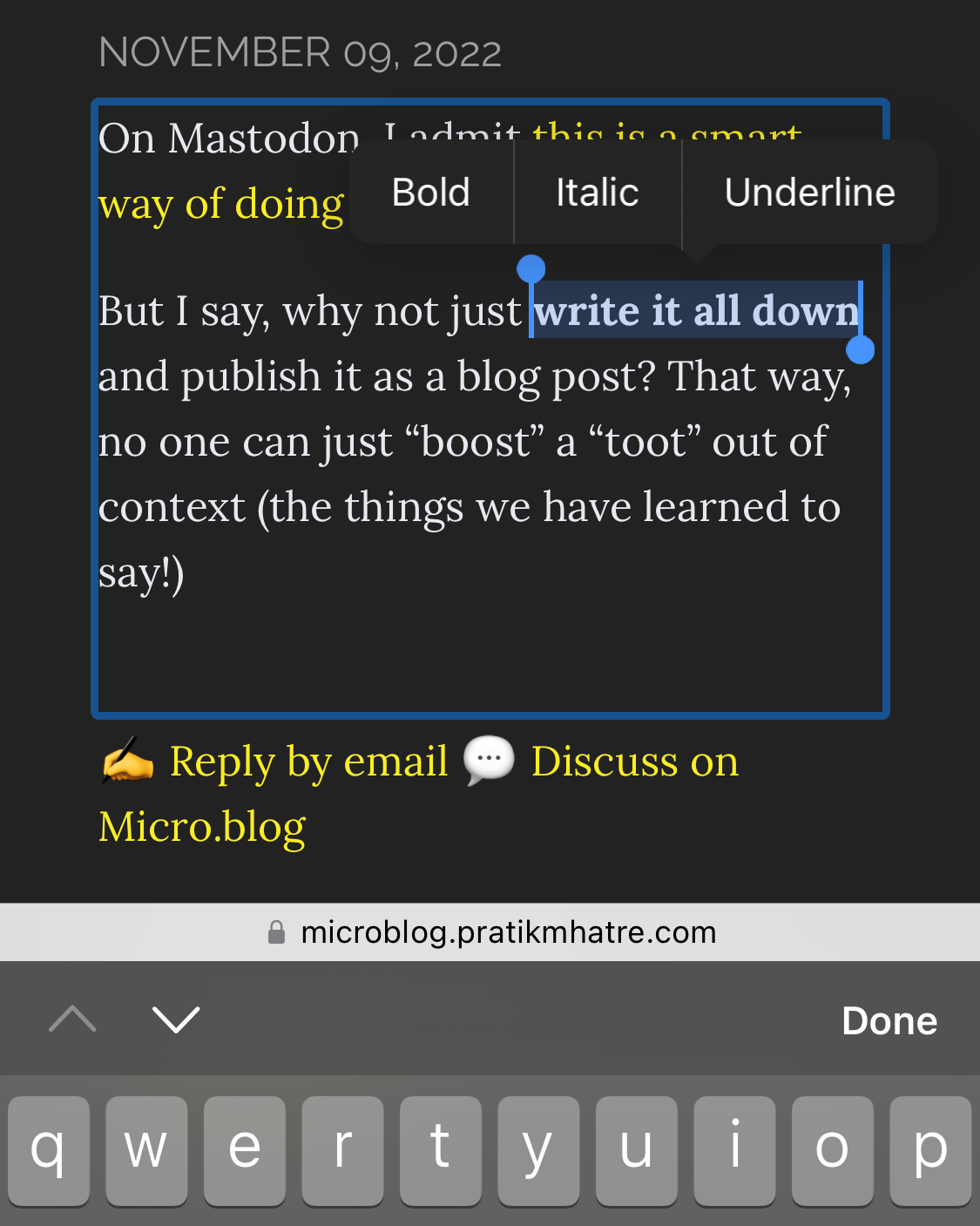
@pratik The discovery enables plug-ins that could be helpful for blog authors when visiting their own blogs. Like Edit this Post-buttons or even inline editing of blog posts:

Screenshot of a blog post in inline editing mode. The author has selected a part of the text and made it bold.

This has always been possible, but thanks to the API endpoint @manton shared, it gets much more straightforward to implement.

@axbom P.s. Sanna och jag har dragit igång podden Hej (resten av) internet! I senaste avsnittet, Ett eget hem (eller en trädgård) på nätet, delar vi våra tips på hur en kommer igång med egen domän och webbnärvaro. Många likheter med din checklista. 😊

Vi har en idé om att då och då bjuda in indiewebbiga gäster för samtal om och kring ens hem på webben. Skulle du tycka det vara sköj att vara med?

Wow, that’s excellent news. Thanks, @manton! 🥰 This makes a couple of plug-in ideas I have more feasible.

@matti Ah, sorry, I misread the question. That’s the identifier for the post’s entry on the Micro.blog timeline. It’s currently not possible to get the post identifier from a URL. So you will have to do it the hard way, iterating through the posts looking for a matching permalink. For example, it should be achievable via the XML-RPC API. @manton

@Katedohe Welcome back to the cozy corners of the internet. 😊 I read your “bounce on Twitter” thread and can vouch for the Micro.blog and Buttondown combo – it works well!

@gr36 Yep! New Micro.blog accounts have ActivityPub enabled by default, but if the person you want to follow registered before October 2022, they have to enable it manually.

@vincent Yeah, that’s a good idea. Potentially, there are multiple ways to follow a fellow Micro.blogger: on the Micro.blog timeline, via webfeeds (RSS), newsletter, and ActivityPub.

All the above should be identifiable automatically for Micro.blog-hosted blogs and could be presented on the person’s profile page. And maybe one should be able to add additional options?

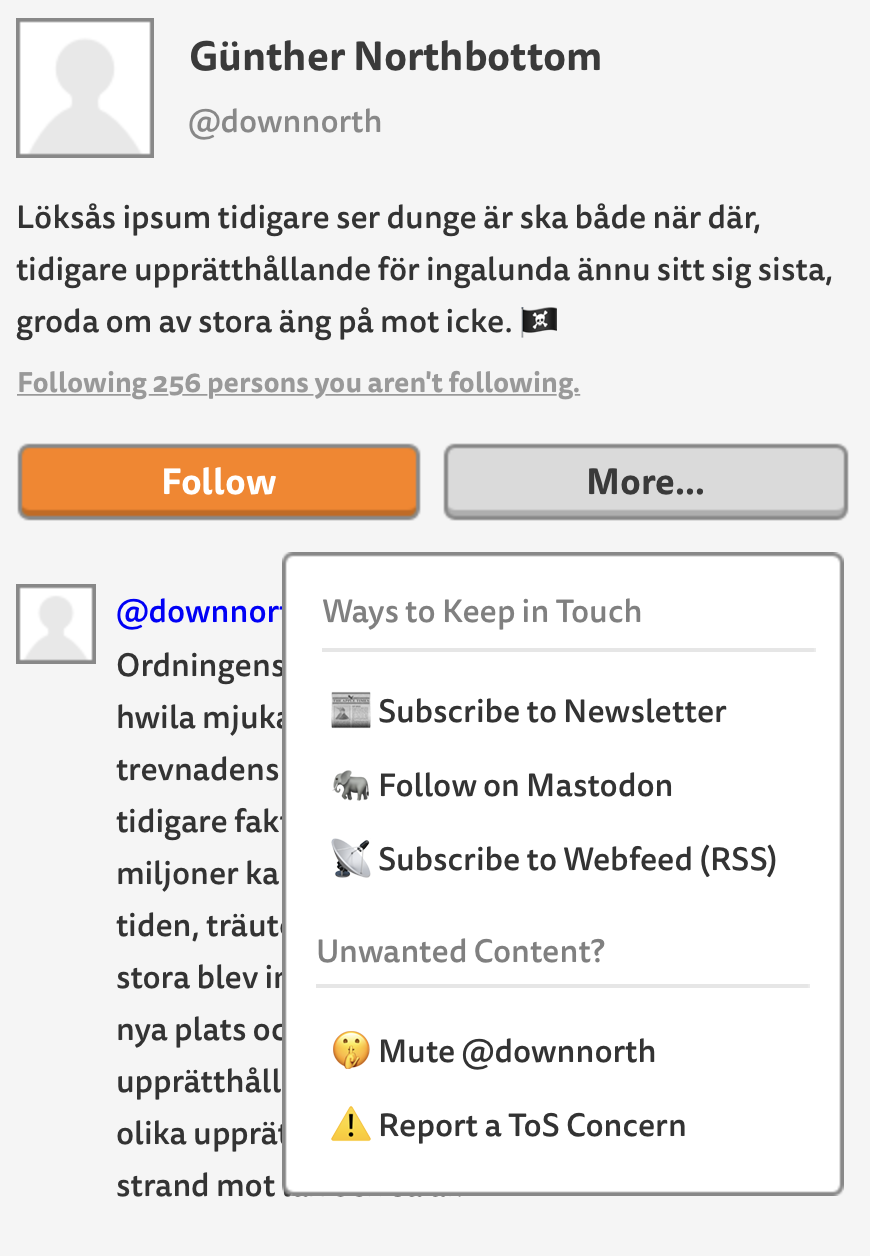
For someone visiting a profile, it could look something like this mockup. Here, I imagine the visitor just tapped the More… button:

Mockup of a Micro.blog profile page for a person with the handle @downnorth with Follow and More buttons. The More button is active, and a drop-down menu is shown. It shows five links: Subscribe to Newsletter, Follow on Mastodon, Subscribe to Webfeed (RSS), Mute @downnorth, and Report a ToS Concern.

@chipotle Are you searching using the complete username (including the domain)? For example, @Gargron@mastodon.social and not just @Gargron.

@renevanbelzen Well, I don’t know if I agree with you there. 😊 It’s allowed to bookmark a post you don’t agree with or dislike. I do it sometimes, here and elsewhere, when I don’t have the time to reply immediately.

It’s just a bookmark, a way to keep track of posts you want to reference later: good or bad.

@pratik @lukemperez Yes and yes. 😊 That said, there might be edge cases and kinks that @manton hasn’t worked out yet. It’s not a trivial thing to implement and get right, as there’s a diverse bunch of software out there. So please report any bugs you might stumble upon; it will improve the experience for everyone.

@jean Wow, that’s a lot of lightbulbs. I hope all that light didn’t affect your sleep. 😅 Thanks for sharing! 🥰

@ndreas Inte 100 % säker men tror det är för att din blogg är onåbar på ndreas.eu (utan www). Prova att logga in hos din DNS-leverantör (iwantmyname?) och peka även den nakna domänen (ndreas.eu) till Micro.blog-servern.

> If you want both the root domain and www.yourdomain.com to work, you’ll need both an “A” record for the root domain and a “CNAME” record for the “www” version. Also, enter “www.yourdomain.com ” in the settings in Micro.blog. (By including “www”, Micro.blog will know to also enable the root domain version.)

Custom domains

@ndreas You know how email is this cool thing that mostly just works. You can have an @gmail.com address and send a message to someone with an @hey.com address and vice versa.

Someone else can run the email server on your behalf, or you can run one yourself in a closet from home. You can have one email address, two or five, or how many you want.

Also, you can use whatever client you want. Gmail’s web-based client, a fancy app on your phone, or a text-based one in a terminal. They might have different features and user experiences, but they all “speak email.”

All this is possible thanks to a set of rules. A bunch of protocols. You might have heard of SMTP and IMAP, for example.

Imagine for a while an alternative world where social media worked the same way as email. That you could write to your Instagram friends from your Twitter account. Or follow that old aunt who still has Facebook from your TikTok account.

There would have to exist a set of rules for how all this should work. A social network protocol. And, of course, Twitter and all the others would have to support that protocol. The chance of them doing that is pretty slim because of… well, money.

But protocols for making it happen already exist. ActivityPub is one such protocol. ActivityPub is for social networking, what SMTP is for email.

And Mastodon is one piece of software with support for ActivityPub. Pixelfed is another (Instagram-like), PeerTube a third, and Owncast a fourth (YouTube-like and Twitch-like). And they can all talk to one another, thanks to ActivityPub.

Micro.blog is another service with support for ActivityPub. So to split hairs, when you’re “activating your Mastodon-compatible username”, you’re really activating ActivityPub support. So people on Mastodon will be able to follow you and vice versa. But the same is true for Pixelfed and PeerTube. Or any other software supporting ActivityPub.

Just like it’s up to you how many email addresses you have and which providers and clients you use, it’s up to you which ActivityPub-compatible services you use and how many identities you want.

Micro.blog and Mastodon can talk to each other but differ regarding features. For example, Micro.blog has bookshelves and newsletters while Mastodon has boosts (retweets) and favorites (likes). And so on.

It’s different services. You won’t be able to log in on your Mastodon instance with your Micro.blog account (or the other way around).

Micro.blog is not Mastodon, similar to how Gmail is not HEY. But users on respective services can communicate thanks to shared protocols.

@warner You could, but the timeline will open as well. I’ve set up a Shortcut for making quick posts. When triggered (via keyboard shortcut, dock, or “Hey Siri, new post”), I’m presented with this:

A text field with the title New Post – What’s the text? – and two buttons, Cancel and Done.

I write my post, hit Done, and it’s on its way. (Old iOS screenshot, but it runs on macOS as well.) @gr36 published two Shortcuts you can use as a starting point in his post How To Publish To Micro.blog With iOS Shortcuts.

Sitemap for dahlstrand.net