@JoeCotellese I knew it was recently, but I had to double-check with my external brain. 😊 It was introduced in iOS 15.
Replies
@heyloura Oh, I LOVE it! 😍
@JohnPhilpin Scrolling back… Yeah, I copped out on day four. 😅
@maique @challenges My thought exactly. 😅
@matti Thank you, Martin. 🥹
@crossingthethreshold 👏 That’s awesome! Shortcuts are powerful.
@pratik Are you sure it’s an actual JPEG and not just a HEIC file with a .jpg filename extension? (That was the case with David’s Shortcut.)
@ridwan RSS is an XML-based format, so no conversation should be needed. But the specific feed in your screenshot is only partially valid. That might cause all sorts of trouble, so we should eliminate the validation errors.
For example, using W3C’s Feed Validation Service, we can see the title currently being set to <no value>, and that’s not great. Try changing the title by going to Micro.blog’s Design page. From there, you should be able to change the Site title to something else.
Then, recheck the feed to see if something else needs fixing.
@yatil If you access Micro.blog via a web browser, you can hide posts from Mastodon folks with the following CSS: .post:has(.post_username > a[href*="@"]) { display:none; }. Some browsers, like Safari on macOS, have built-in support for this. For others, you might have to install a plug-in like Stylebot.
@crossingthethreshold Woohoo, well done! 🎉 If you want to learn more, Apple’s official Shortcuts User Guide is a great start. Good night!
@crossingthethreshold The pool photo is a HEIC file, not a JPEG. So the Shortcut is probably uploading the original image, not the one from your conversion action.
When editing, tap Show More in the Get Contents of URL acition (the last one). There should be a Key called file there; make sure the value is the JPEG photo and not the original.
There is no such thing as a silly theory. 😊 But a weak WiFi signal results in either a slow connection (the Shortcut takes a while to run) or no connection at all. Shortcuts notice if you’re offline, and you will get an error message: “The Internet connection appears to be offline.”
The reason why you get the question marks is that you’re uploading HEIC files. That’s not a file format web browsers support. You can download the question mark file and look at it on your computer. So the Shortcut has been working all the time – it’s just that browsers don’t speak HEIC. cc @pratik
@jean Haha, you’re right. This might be my breakthrough as an actor.
@crossingthethreshold I can take a look if you’re okay with sharing the URL to the uploaded file. Make sure it’s something you’re okay with sharing publicly. 😅
@crossingthethreshold That gray square and question mark are almost certainly because you’re uploading HEIC files or another file format not supported by your browser. Try uploading a JPEG or PNG instead.
Regarding the other Shortcut: the Humboldt app may not be installed on your device.
@jmuscara @jean @help To follow a person, they need to host their content on their own domain or subdomain. Like example.com or example.tumblr.com. People hosting content under directories like tumblr.com/example/ can’t be followed. Also, there needs to exist a web feed (RSS, Atom, or JSON). Neither is true for the two examples you provided, unfortunately.
If you share a person you can’t follow on Mastodon, I will try to figure out why.
@crossingthethreshold Thanks for sharing. Both Shortcuts worked for me on iOS 16.1.1. Hard to tell why they are not on your device.
Regarding privacy and permission, the Shortcuts need access to your Photo library and make network requests to micro.blog. So make sure that’s the case by editing the Shortcut, hitting the ℹ️ followed by Privacy.
You can also try running the Shortcuts in editing mode. Sometimes that gives a clue as to where things go wrong.
Ensure the file you are uploading is a JPEG or PNG (not a HEIC). Also note that if you have more than one blog, the uploads might end up on one you’re not expecting it to. (The last one you selected in the web interface.)
As a last resort, try removing and re-installing the Shortcuts.
@pratik is right that it’s possible to design Shortcuts that only work on one platform or the other. But that’s not true for the two Shortcuts you’ve shared. They work fine on both macOS and iOS.
@crossingthethreshold If you share the Shortcut that ain’t working, I can take a look.
@emsariel I read Bubble last year, you’re in for a treat. 👽
@ericgregorich Just like @manton, I’ve used custom style blocks in some of my plug-ins. It’s fast and easy, but if you have a lot of CSS, you might want to break it out to separate files. Hugo has a robust assets pipeline, so you can: have dynamic (template-based) CSS files, bundle multiple CSS files into one, process SASS and SCSS, run minification, and more.
There’s a minimal example on the page Creating a resource from a template.
@kaa I tried explaining Micro.blog’s ActivityPub support the other day. It might make it somewhat clearer. Or not. 😊
@otaviocc Maybe different from what you’re after, but it looks like there’s an API for fetching highlights.
@axbom Åh, va roligt, vi hör av oss över mejl när konceptet har knådats lite till.
@pratik @rknightuk There can only be one!!1! 😂 But seriously, the more plug-in developers and theme magicians, the better. Thanks for sharing your work with the community, Robb! 🥰
@danielsantos On the search result page, there should be an Add to bookshelf… section where you can add the book to one of your shelves. But only if you’re signed in to your Micro.blog account.
Sometimes when you follow links, they open in in-app browsers or a browser where you’re not signed in. When that happens, you must sign in or switch to a browser where you’re already signed in. Also, see this conversation. Ping @manton.
@msnintendique64 I use the Reminders app for that, with a list called Inbox. It’s my default list. Using the share sheet, I can put almost anything in there for processing later. Websites, files, text selections, whatever. Works with Siri as well.
@maique Oh, tinyMovieStar is so cool! 😎 I miss my last bathrobe. 🐙
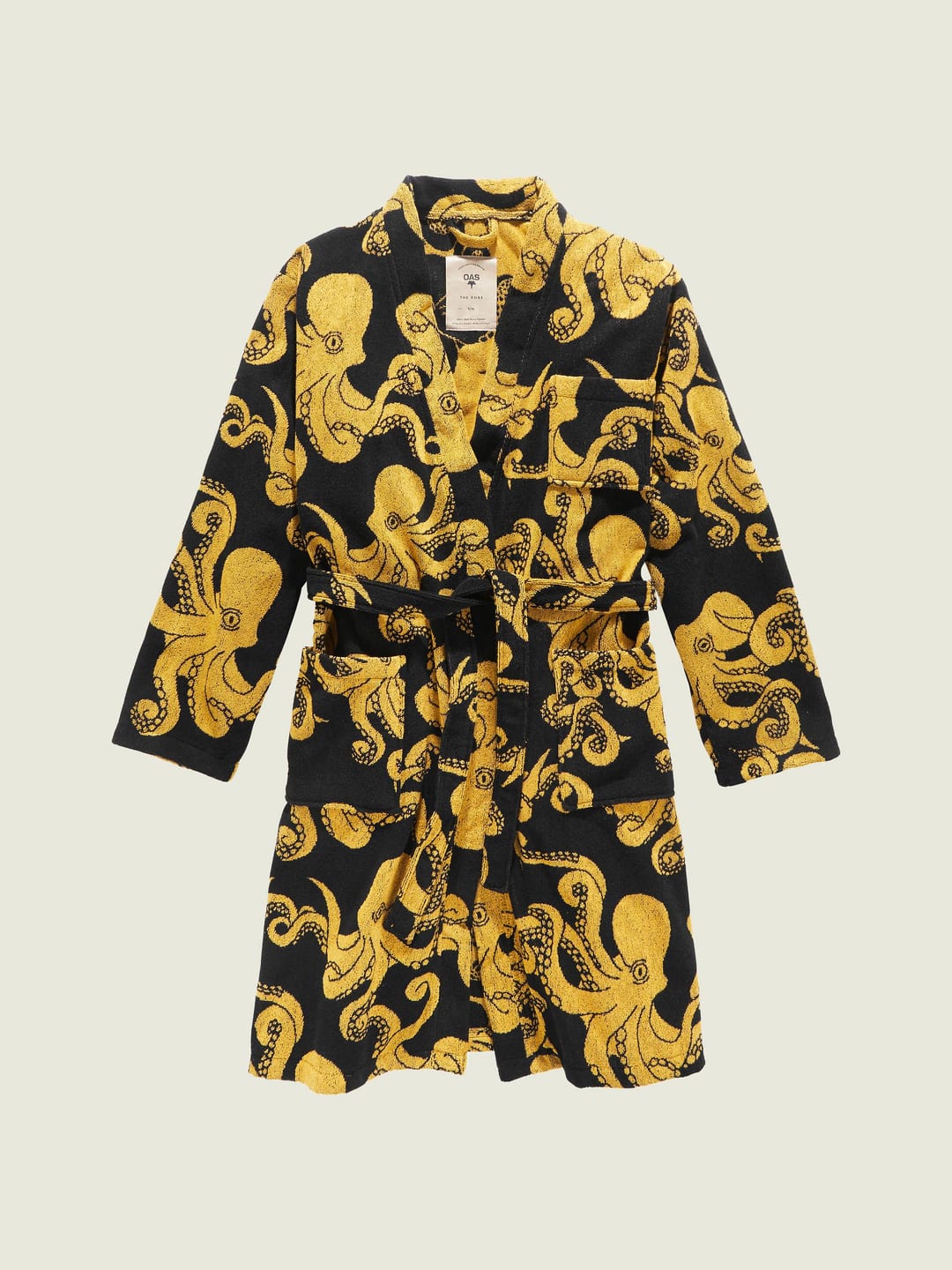
@manton Yay! 👏
@Munish Install the No robots plug-in and you should be set.
@ChrisHannah Congrats! 🎉 Interesting read. Did you notice an increase in interactions or subscriptions? For example, Mastodon follows, emails, more requests to the RSS feed, people checking out your app, and so on?
@maique You should write a book! The 7 Minutes Work Week. Would buy. 😊
@pratik The discovery enables plug-ins that could be helpful for blog authors when visiting their own blogs. Like Edit this Post-buttons or even inline editing of blog posts:
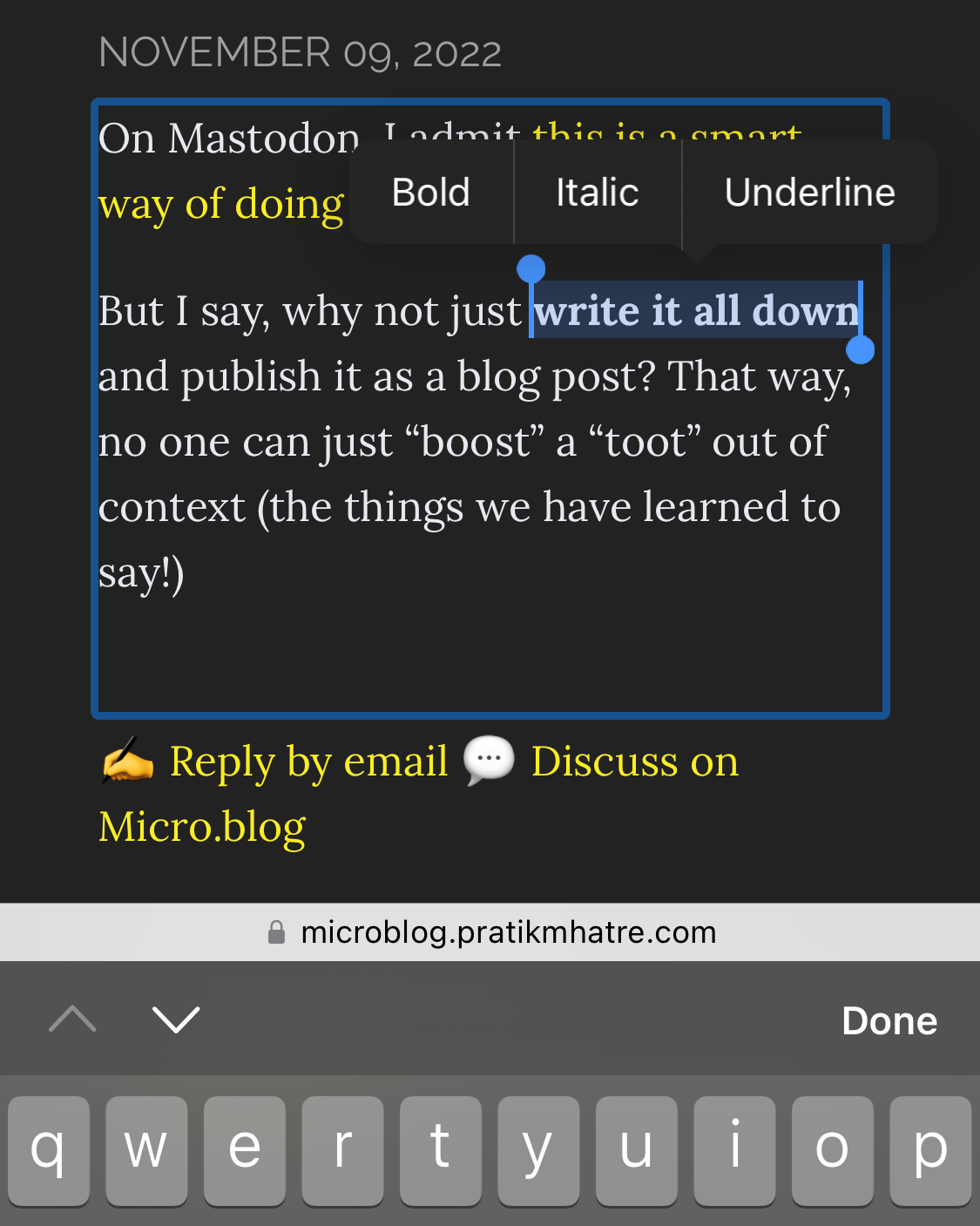
This has always been possible, but thanks to the API endpoint @manton shared, it gets much more straightforward to implement.
@axbom P.s. Sanna och jag har dragit igång podden Hej (resten av) internet! I senaste avsnittet, Ett eget hem (eller en trädgård) på nätet, delar vi våra tips på hur en kommer igång med egen domän och webbnärvaro. Många likheter med din checklista. 😊
Vi har en idé om att då och då bjuda in indiewebbiga gäster för samtal om och kring ens hem på webben. Skulle du tycka det vara sköj att vara med?
@axbom Wow, I wish I could have afforded my own domain back in ’97. 🤩 But at 11, that was out of reach. So my home back then was over at home.swipnet.se/~w-31311/…
Wow, that’s excellent news. Thanks, @manton! 🥰 This makes a couple of plug-in ideas I have more feasible.
@matti Ah, sorry, I misread the question. That’s the identifier for the post’s entry on the Micro.blog timeline. It’s currently not possible to get the post identifier from a URL. So you will have to do it the hard way, iterating through the posts looking for a matching permalink. For example, it should be achievable via the XML-RPC API. @manton
@matti You can get it via Conversation.js (example).
@Katedohe Welcome back to the cozy corners of the internet. 😊 I read your “bounce on Twitter” thread and can vouch for the Micro.blog and Buttondown combo – it works well!
@gr36 Yep! New Micro.blog accounts have ActivityPub enabled by default, but if the person you want to follow registered before October 2022, they have to enable it manually.
@MarcoZehe Welcome! Or should I say welcome back? 😊 Good to have you here.
@jemostrom Could it be to get more people to vote through peer pressure? The US has a lower voter turnout (62.8 % 2020) than we have here in Sweden (80.3 % 2022). I would wear this sticker. 😊
@maique Nice! Shortcuts are perfect for creating small, helpful tools like that.
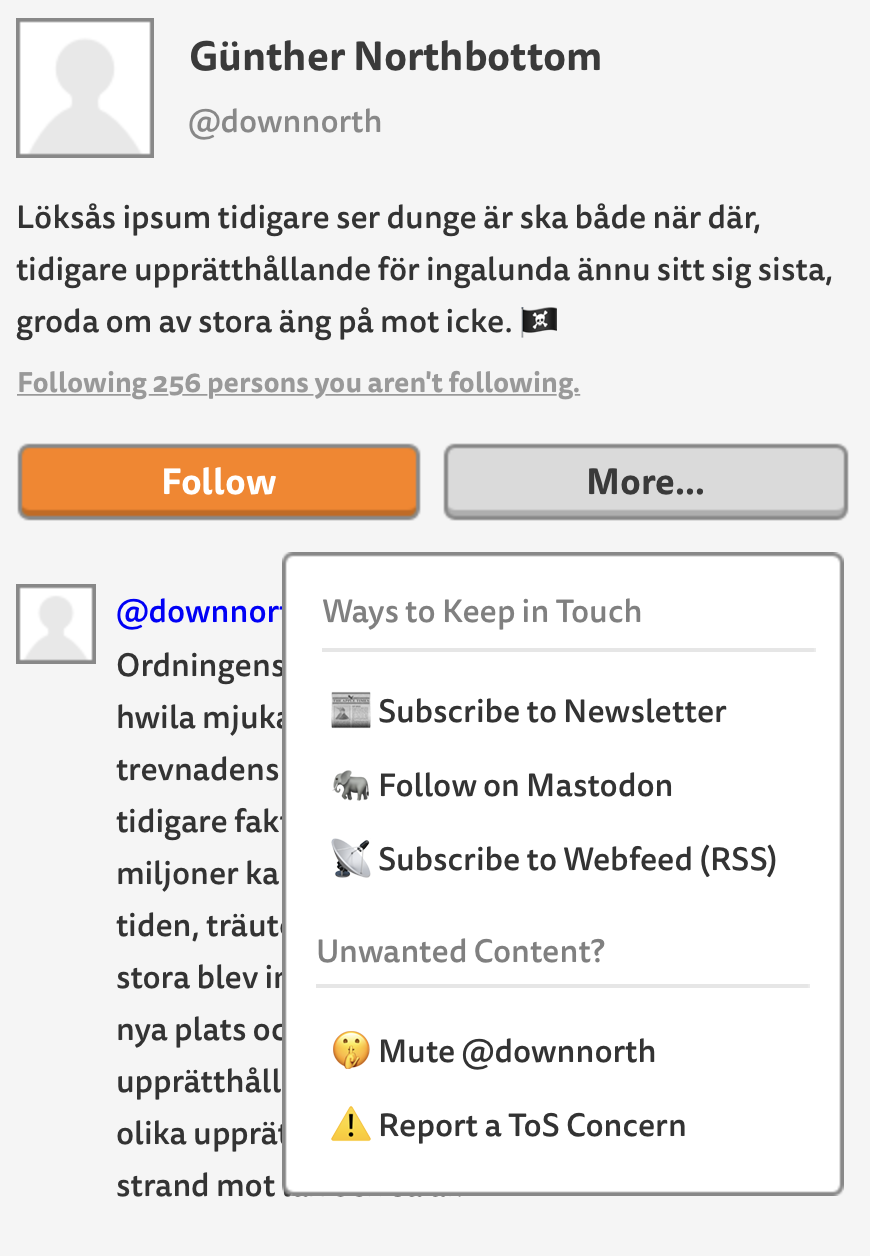
@vincent Yeah, that’s a good idea. Potentially, there are multiple ways to follow a fellow Micro.blogger: on the Micro.blog timeline, via webfeeds (RSS), newsletter, and ActivityPub.
All the above should be identifiable automatically for Micro.blog-hosted blogs and could be presented on the person’s profile page. And maybe one should be able to add additional options?
For someone visiting a profile, it could look something like this mockup. Here, I imagine the visitor just tapped the More… button:
@gr36 @topgold Currently, I think the easiest way is by appending this query parameter to the end of their Micro.blog profile URL: ?remote_follow=1. Then, a form for following the person will appear. Example: https://micro.blog/manton?remote_follow=1.
@purisubzi And you can always migrate to another server in the future. You’re not stuck on the instance you choose for all eternity. Unless you want to. 😊
@cliffordbeshers @jean 👏 I love how you write a short program to help you reason. That’s something I do as well. Another date trivia: three different calendar dates can be observed simultaneously for a couple of hours each day.
@gaelicWizard @kandr3s Oops! I removed my original reply by mistake. Here it goes again:
> No custom domain is needed, but you do need to activate ActivityPub.
@kottkrig Ser mysigt ut! 🥁