@uncertainquark You’re most welcome! It’s always a pleasure reading about people enjoying my plug-ins. Thanks for telling me. 🌝
Replies
@fgtech @lmika @cdevroe @johnjohnston @toddgrotenhuis @Sylari @cn @gregmoore @parag @jean @maique @pratik Sometimes I wish Micro.blog had a reply-all button. 😅 Thanks everyone. I’m glad you enjoyed my random entry hack.
@cn There’s a roughly 6 % chance for that to happen in just three clicks, so consider yourself lucky. 🍀 Maybe you should go and buy a lottery ticket today? 😉
@mymarkup Samma här! Det finns en handfull folk på nätet som verkar så där extra synkade med mina intressen och hobbyer. Och Robin är en av dem. Jag slukar det mesta han delar med hull och hår.
@kwh This photo makes me crave a cup of good, hot, black coffee.
@cdevroe Rek and Devine are Hundred Rabbits – a small artist collective living on a sailboat, primarily off-grid. Their output is so diverse and always a joy to indulge in. Books, games, software tools, recipes, guides on how to live off-grid, retro computing, and much more.
They also run webring.xxiivv.com, where you will find a bunch of humans that make stuff.
> This webring is an attempt to inspire artists & developers to build their websites and share traffic amongst each other. The ring welcomes hand-crafted wikis and portfolios.
@maique Oh, yes, you most definitely should! 😎
@odd Ah, sorry, no. My rough sketch above is about adding support for webmentions and replying to blog posts where the author has no presence on Micro.blog.
@help Maybe something like this? Sorry for the long post. 😋

@scojjac If you’re comfortable writing Go Templates you could create a Hugo shortcode to at least lessen the number of characters you have to type. So a reply could be entered, for example, like this :
> {{< reply “https://example.com/interesting-blog-post.html” >}}
@manton authored a similar shortcode for RSVPing.
@jack @petebrown @rknightuk Have you guys tried changing the option described below the heading Prevent AirPods from switching away from your Mac on this page?
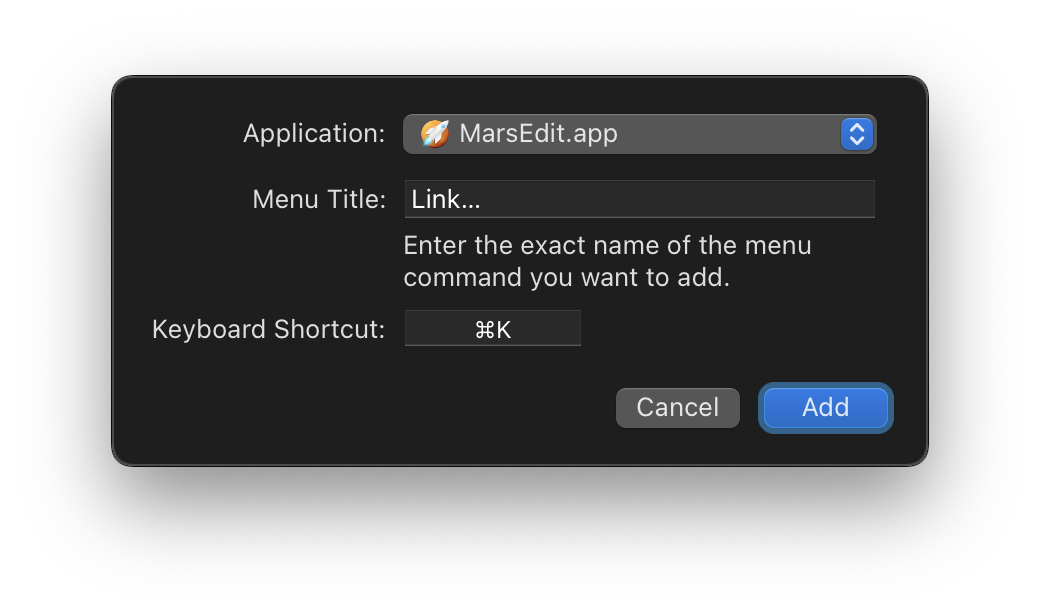
@uncertainquark You can create your own keyboard shortcuts for menu commands in any macOS app, including MarsEdit.
@shep Yes, tap the image thumbnail followed by Inline Image. Then look at my example here.
@bjhess That is correct. I confirmed this on my test blog just now by deleting a category and rebuilding the entire site. All posts that had that category are still there.
@tomc Yeah, backing away slowly is sometimes the best tactic. 😆 Have you read Timeline display rules? That might explain why the first one turned up as a link. Maybe.
@Miraz That happened to us as well. 😂 I played with my girlfriend, and if I remember correctly, it took us four playthroughs until we got to a satisfying ending.
@odd Yay, good luck getting away with murder. 😊
@Miraz Do you play video games? Based on the books on your timeline, I think you might enjoy Overboard!. It plays like a cozy murder mystery book, but you’re the antagonist. 🦹♀️
> Overboard! is a whodunnit where you’re the one whodunnit. You have just eight hours to cover the evidence, mislead the witnesses, frame another suspect and escape … if you can!
@tomc Yay! Images work on the free plan, and I see them alright on your timeline. 😊
@odd @Mandalorian @JohnPhilpin Thank you! 🥰
@maique You have no idea the smile on my face right now. ☺️ Thanks for helping make the web a more accessible place.
The screenshot nicely illustrates my mental model of alternative texts – they are just paragraphs and should go well with the rest of the blog post. That makes it pretty enjoyable to compose them, I think.
@maique A beautiful planet indeed. Wow!
@zorn Well, that message is very applicable to yours truly. 😅
@annahavron Thanks for checking it out! 🥰 I see you’ve added alternative text for the photos on your blog now. That’s awesome; good work!
@toddgrotenhuis My physical library is tiny as I do most of my reading on electronic paper. But yeah, I guess I do have a tendency to judge – or at least buy – books by their covers. 🤩
@crossingthethreshold Hmm, you’re right. I downloaded iA Writer just now. The alt text provided via markdown is shown below the image as a caption when previewing.
That’s a rather unusual design decision by the developers. And they are not consistent either. Images included via HTML do not show the alt text in preview. I totally get this threw you off.
@maique Woohoo! 🥳
@pratik Yes, that’s for the alt text. You have to resort to HTML and the figcaption element for captions.
@cdevroe Sadly, I have to reach for Chromium for most of my side projects to access Web MIDI, USB, Serial, Bluetooth, and friends. 😢 The official explanation from the WebKit team is that those APIs can be used for fingerprinting, but come on, just make it a flag and let the user opt-in. It’s a lame excuse.
@maique Oh yes! It looks and sounds fantastic. 🍻
@odd Yeah, I know! 🤯 There are a lot of hidden tricks like this. The keyboard as a trackpad feature arrived with iOS 12, and paste by spreading your fingers was introduced in 13.
@artkavanagh Two things you might not know: you can move the insertion point more easily by tapping and holding the space bar and then moving your finger. And to paste, you can touch the screen with three fingers and spread them apart.
@maique Thanks! I’m so happy you are curious to give it a try. Here’s how you set the alternative text using markdown:

@the Thanks!
@scojjac Thanks! Reading about your alt-texting efforts makes me happy.
@jean Thanks for spreading the alt love! 🥰
@odd Wearing those sunglasses like a boss! 😎
@frogplate Oh, man. 😅 Everything to save on hardware cost, I guess. Thanks for sharing this.
@lmika Oh, nice! It’s fantastic that Go runs on microcontrollers as well.
@kottkrig Har du spelat deras nya, Knotwords? Har ju inte haft chansen att testa det till sommarkaffe än, men det bör gå. 😊
@Munish I use iOS’s built-in VoiceOver and Spoken Content feature.
@dfj I would have difficulty obeying that do not touch sign. 👈
@herself Thanks! 🥰
@shindakun I predict fantastic Micro.blog plug-ins in the near future. 😉